
Overview
Desktop database workbench (Nuvexa Data Studio, project Nuventra.NuvexaDB.Explorer) for a single encrypted or plaintext .nvx file. Windows, macOS, and Linux. Built with Avalonia 11 and Plugin.Avalonia.MVVMExpress. The same ExplorerSession (Nuventra.NuvexaDB.Tools) backs the Visual Studio tool window and the VS Code / Cursor custom editor. Browse paging (BrowsePageAsync), query examples (ExplorerQuerySample), explain text, and collection captions (customers (6)) are shared. VS Code reaches those APIs through the nuvexa binary CI publishes into the VSIX (cli/nuvexa), falling back to the Nuventra.NuvexaDB.Cli tool on PATH. The Visual Studio VSIX bundles the same binary under cli/.
Mental model: collection = table, document = JSON row, field = column. _id is always the primary key. Declared types live in the hidden collection __nuvexa_schema (hidden from the tree and from user-facing stats).
This page is the capability inventory for product docs. The narrative white paper is whitepaper.md. Engine file format, encryption, and NQL are in format.md, encryption.md, and query.md.
Surfaces
| Tab | Purpose |
|---|---|
| Database Structure | Tree of collections. Selecting a collection shows its columns in the right pane (add / edit / delete). Context menus still work. |
| Browse Data | Spreadsheet of one collection. Cell leave, new/edit/delete record persist immediately to the .nvx. |
| NQL | Nuvexa Query Language find / aggregate. Results grid, explain line, JSON export. |
File menu: New / Open / Open Recent / Close, Import/Export JSON or CSV, Export Query Results as JSON or CSV. Tools: change encryption key, compact, backup, restore, database properties. View → Theme follows the system appearance by default (Light / Dark override). View → Read-only disables writes. Help → About Nuvexa is the product page (author, MIT, GitHub / NuGet). Drag a .nvx onto the window to open it. The workbench uses Nuvexa navy/cyan surfaces, Inter, a compact toolbar, and resizable Structure / Browse / NQL panes.
File and session
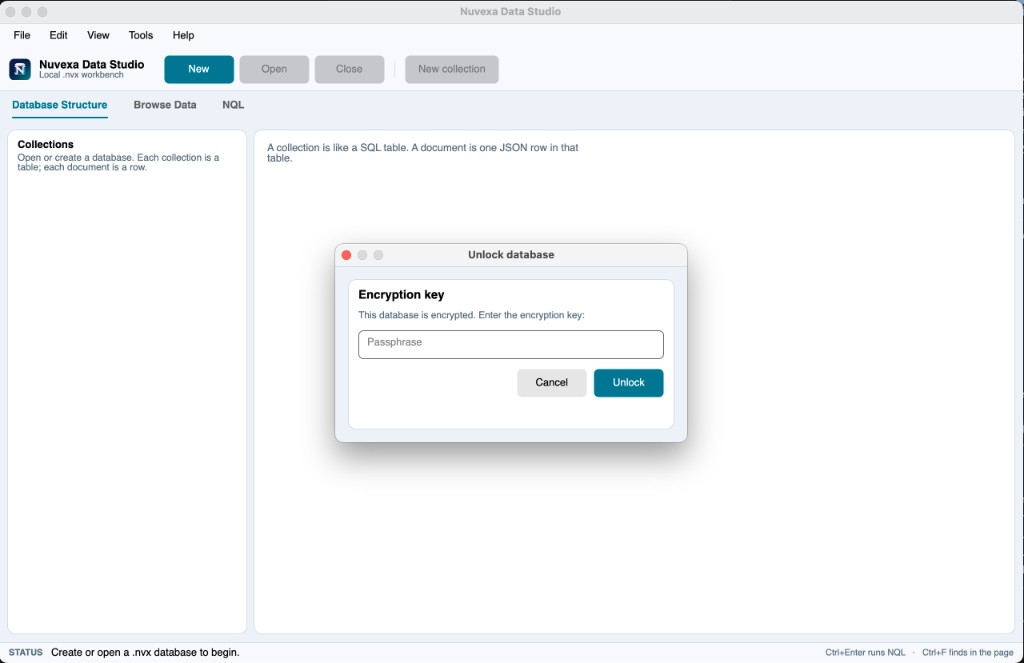
- Create or open a
.nvx. New files and writes are format 2. Format 1 is deprecated and still opens (read, then a write promotes the file to format 2). Encrypted files prompt for the key; a wrong key does not open the file (NuvexaEncryptionException). - Optional encryption on create (empty key = plaintext).
- Open Recent remembers the last 12 full paths only. The passphrase is never written to that list (
~/Library/Application Support/NuvexaDB/explorer-recent-files.jsonon macOS; equivalent Application Data folder on Windows / Linux). - Missing recent paths are dropped when the user picks them.
- Status bar shows path, user-visible document count (schema collection excluded), encrypted flag, format version, and file size.
- Compact rewrites the file in batches (encryption is preserved) and keeps the session open. Change key re-wraps the DEK; pages are not rewritten. A second process cannot open the same
.nvxwhile Explorer holds it.
Database Structure
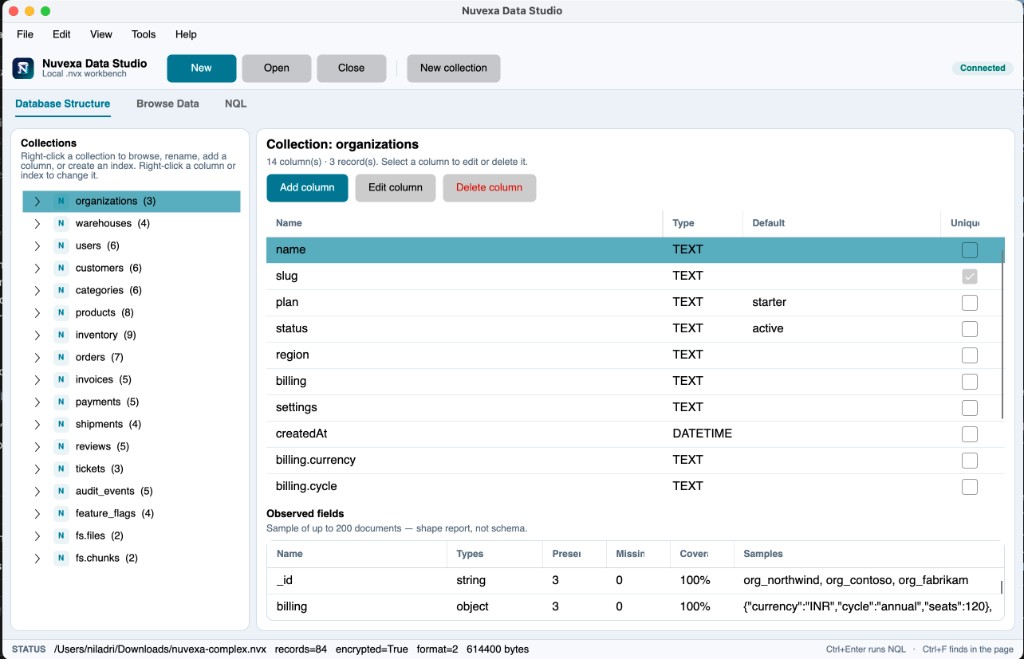
- Selecting a collection loads its columns in the right pane (name, type, default, unique). Add Column, Edit Column, and Delete Column work from that grid; double-click a row to edit. Inferred columns from existing documents appear even when
__nuvexa_schemais empty. - Observed fields samples up to 200 documents (name, JSON types, present/missing, coverage, example values). This is a read-only shape report, not
__nuvexa_schema. - Tree groups: Columns, Indexes. No context menu on the group rows.
- Collection caption includes row count (
customers (6)). Insert, delete, and browse reload update that number in place (the tree stays expanded). - Empty tree: Add collection. Collection: Browse Data, Add Column, Create Index, Rename Collection, Delete Column, Delete Collection.
- Column: Edit Column, Delete Column. Index: Drop Index (
_id_cannot be dropped). - New collection opens the table-definition dialog (name, typed columns, unique → secondary index).
- Add / edit column: name, type (
TEXT,INTEGER,REAL,BOOLEAN,DATETIME), default. Existing rows get the default on add. Rename copies the field then unsets the old name ($renameis not in the engine). - Create index: field path, optional name, unique. Drop index removes a secondary index only.
- Rename collection updates the catalog name and the schema document. Rows and indexes stay on the same pages.
Browse Data
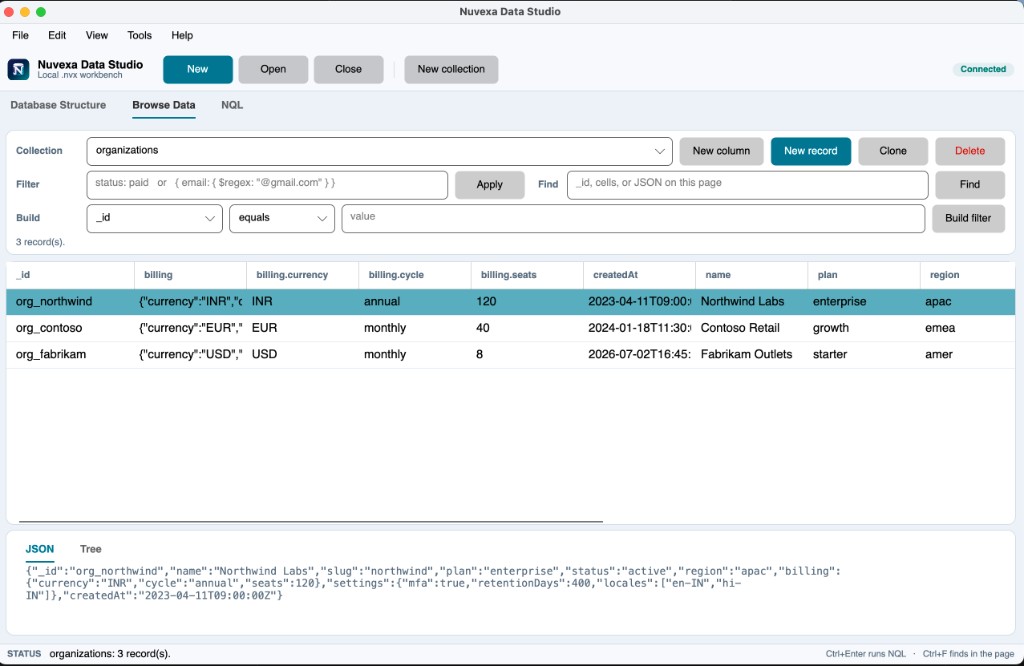
- Collection combo, New Column / New Record / Delete Record.
- Filter: NQL JSON (
{ status: "paid" }) or shorthand (status: paid,age = 21). Enter or Apply. Invalid filter keeps the current grid and shows the error above it. Build writes that same filter text from field / operator / value. - Find in page searches
_id, cells, and JSON on the current 200-row page only. It does not change the server filter. - Status:
N matching row(s)when the filter fits on one page, orShowing A–B of Twith Previous / Next when there are more than 200 rows. Each browse page is 200 documents. - Grid:
_idread-only. TEXT / INTEGER / REAL as text. BOOLEAN as a checkbox (click saves). DATETIME as a date picker. Values that look like{…}/[…]edit as wrapped JSON. - Double-click a cell to edit. Leaving a text cell saves that column. Right-click: new / edit / delete record, copy cell, copy record JSON, new column.
- Selected record pane is read-only JSON plus a Tree tab. Edits go through the grid or Edit Record. There is no separate Write / Revert; CRUD is auto-save.
- Clone Record inserts a copy without
_id. Shift/Ctrl click selects several rows for delete. Click a column header to sort the current page.
NQL
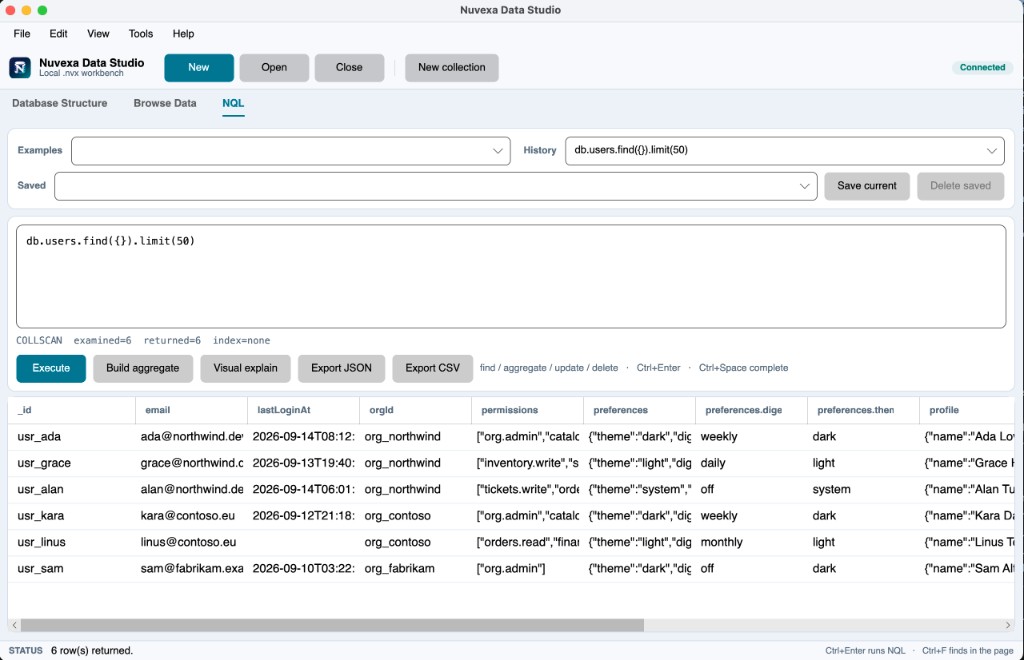
Supported NQL (Nuvexa Query Language) — same engine as the library:
db.<collection>.find({ … }).sort().skip().limit().page().project()
db.<collection>.aggregate([ … ])
Find operators: $eq $ne $gt $gte $lt $lte $in $nin $and $or $exists $regex. Aggregate stages: $match $project $sort $skip $limit $count $lookup.
- Examples dropdown fills a template for the current collection (find, page, equality, regex, sort,
$count,$lookup).
Page 2 of 200 rows is db.tickets.find({}).page(2, 200) (same as .skip(200).limit(200)).
- History stores the last 20 successful query texts (no documents, no keys) in
explorer-query-history.json. - Saved queries are named bookmarks in
explorer-saved-queries.json(text only). - Ctrl+Enter or Execute. Parse errors stay above the last good result grid.
- Explain under the editor:
ID/IXSCAN/COLLSCAN(orAGGREGATE), examined, returned, index name. - Export Results writes a JSON array. The save dialog is labeled JSON file. If the name already ends with
.json, it is kept; otherwise.jsonis appended.
Security notes for a white paper
- The Explorer is a local process over one file. It is not a network server and does not register remote users.
- Passphrases are prompted, used to unwrap the DEK, and not stored in source, in the
.nvx, or in recent-file / query-history JSON. - Superblock remains readable so the IDE can detect encryption before the DEK exists. See encryption.md.
- Open is fail-closed on tamper: superblock CRC, page CRC / AES-GCM, and (when encrypted) an HMAC over the superblock. A mismatch throws
NuvexaIntegrityExceptionand the file is not opened. The IDE does not repair the file. - Weak demo keys (for example
1234) are guessable; that is a passphrase problem, not a leaked key in the product.
Distribution
CI builds native installers for x64 and ARM64 (Windows .msi, Linux .deb / .rpm, unsigned macOS .pkg to /Applications for now), a VS Code VSIX per RID (with bundled nuvexa), a Visual Studio VSIX (with bundled cli/nuvexa), the PackAsTool Nuventra.NuvexaDB.Cli nupkg (NuvexaDB-Cli), and uploads them as GitHub artifacts next to the packed Nuventra.NuvexaDB nupkg. nuget.org push is commented out. Packaging scripts: src/Nuventra.NuvexaDB.Explorer/packaging/, .github/scripts/pack-cli.sh, .github/scripts/pack-vscode.sh, and .github/scripts/pack-vsix.sh.
Visual Studio and VS Code
These hosts use the same session APIs as the desktop IDE. They do not duplicate browse/query logic.
| Feature | Visual Studio | VS Code / Cursor |
|---|---|---|
| Open Database / Close Database | In-process NuvexaToolWindow (VSIX also bundles cli/nuvexa) | nuvexa.open / nuvexa.close |
| About (author, license, links) | About tab (NuvexaAbout) | About tab + nuvexa.about |
| Collapsible collection tree (Columns / Indexes, row counts) | Same session tree | nuvexa tree |
| Browse Data (filter, Build filter, find-in-page, JSON/Tree, 200-row pager, editable cells) | BrowsePageAsync + ReplaceDocumentAsync | Bundled nuvexa browse / nuvexa replace |
| Execute Query (NQL find / aggregate / update / delete, explain) | ExecuteAsync + ExplainQueryAsync | Bundled nuvexa query + nuvexa explain / nuvexa samples |
Avalonia Data Studio still has the typed browse grid (BOOLEAN checkbox, DATETIME picker), Edit table definition, aggregation builder, visual explain, and Ctrl+Space NQL completions. Visual Studio and VS Code browse cells are editable.
Not in the Explorer yet
- OS keychain for the last key
- Signed / notarized macOS installer